Features
Built for Those Who Value Quality
Most admin menus are clunky, overloaded, and slow. We built ours differently. Every line of code was written with performance and security in mind. The result? An interface that's intuitive, responds instantly, and looks great.
Customizable Layout
Move and adjust UI elements to fit your needs. All changes are saved automatically, so you don't have to worry about losing your setup.
Admin UI
Get quick access to key player details (Name, ID, HP and Armor) just by aiming at them. No need to search through menus — everything you need is displayed instantly.
User Page
View and edit the most important player details in one place. Player stats, history, and other essential info to help you manage the server.
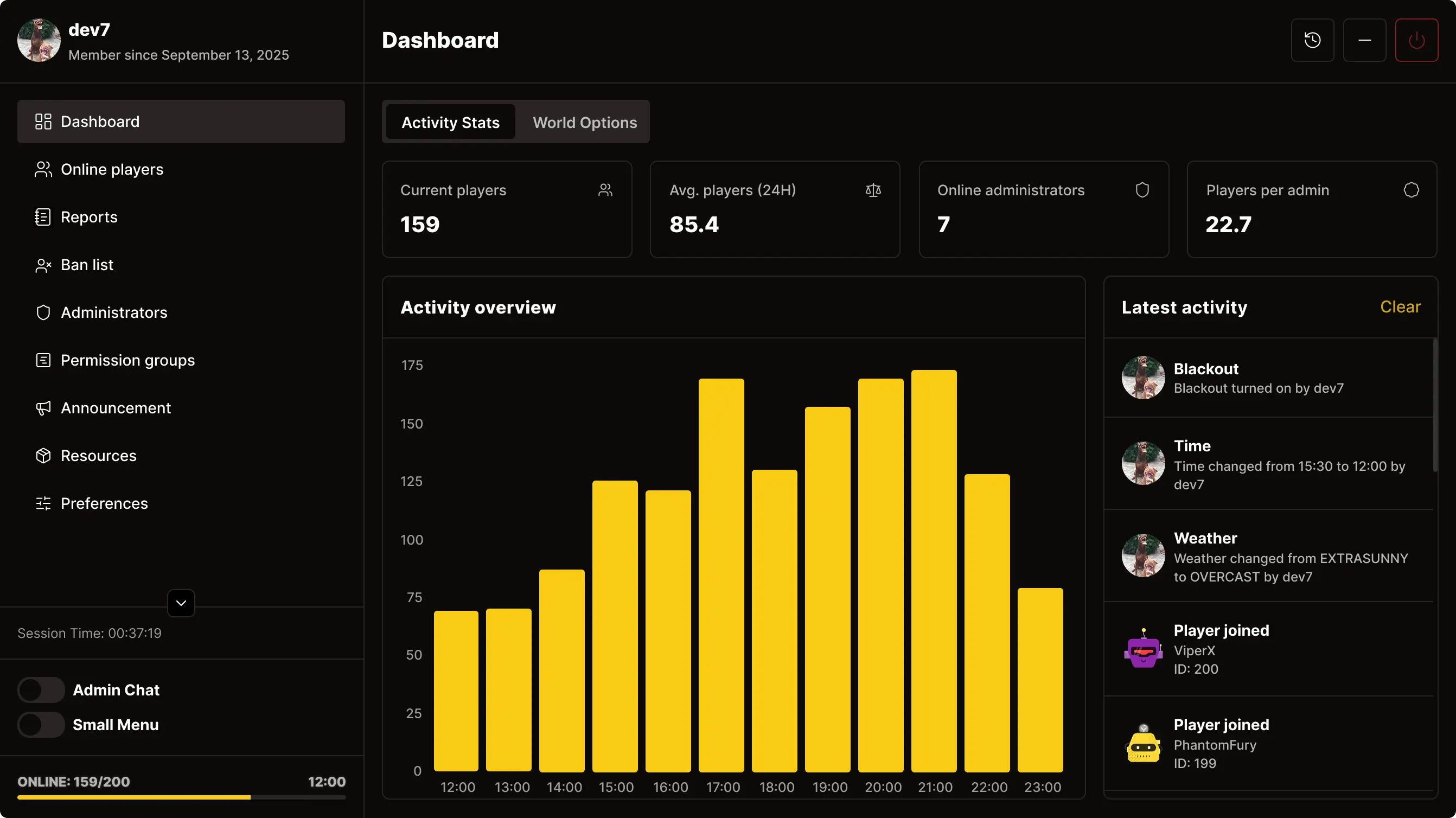
Dashboard
Stay updated in real time. The main dashboard shows live server stats and a live activity feed — reports, admin actions, everything.
Administrators Management
Track your admin team's activity with detailed statistics: playtime, spectated players, handled reports, bans, and more. Manage permissions per admin and stay in full control of your staff.
Compact Admin Chat
Improves communication between administrators significantly. Quickly share links to reports or player profiles without leaving context.
Report System
Custom report system with real-time chat between player and administration. Keep everything organized and nothing missed.
Preferences
Every detail is configurable. Customize the menu to your needs — even NoClip behavior is adjustable.
Watch It In Action
Presentation as of March 31, 2024 — new showcase coming soon.
'%3e%3cpath%20fill-rule='evenodd'%20clip-rule='evenodd'%20d='M92.1897%2038.8925C93.8935%2036.5639%2096.5434%2035.2877%2099.7233%2035.2877H99.7272C105.855%2035.2877%20110.135%2039.9173%20110.135%2046.3532C110.135%2052.7891%20105.726%2057.458%2099.6448%2057.458C96.3942%2057.458%2093.8071%2056.2446%2092.1269%2053.9397L92.0169%2056.9436H87.3727V27.234H92.1897V38.8925ZM99.3857%2053.3899C103.115%2053.3899%20105.718%2050.5548%20105.718%2046.4985C105.718%2042.348%20103.402%2039.5639%2099.6251%2039.5639C95.8485%2039.5639%2093.2104%2042.3126%2093.2104%2046.4985C93.2104%2050.6844%2095.6562%2053.3899%2099.3857%2053.3899ZM58.6712%2052.7027C57.4778%2053.6137%2056.5277%2053.9671%2055.2754%2053.9671C53.4303%2053.9671%2052.3703%2052.8441%2052.3703%2050.8807V39.7995H60.112V35.5351H52.3703V29.9984H47.5534V35.5312H44.2047L43.1133%2039.7956H47.5534V50.92C47.5534%2055.7695%2050.1326%2058.4397%2054.82%2058.4397C56.9596%2058.4397%2058.8675%2057.78%2060.6459%2056.4213L60.7755%2056.3232L58.8597%2052.5574L58.6712%2052.6988V52.7027ZM72.7374%2035.1189C66.5778%2035.1189%2062.1102%2039.7917%2062.1102%2046.2276C62.1102%2053.0012%2066.3619%2057.3756%2072.9376%2057.3756C76.6946%2057.3756%2079.5015%2056.229%2081.7628%2053.7669L81.8805%2053.6412L79.3249%2050.5588L79.1717%2050.708C77.4091%2052.4318%2075.5875%2053.2014%2073.2556%2053.2014C69.5967%2053.2014%2067.3472%2051.1949%2066.9036%2047.5391H82.7285V47.3428C82.7285%2047.1464%2082.7364%2046.9619%2082.7481%2046.7773C82.7599%2046.5849%2082.7678%2046.3925%2082.7678%2046.1883C82.7678%2039.4658%2078.8302%2035.1189%2072.7374%2035.1189ZM67.0018%2044.382C67.6142%2041.3231%2069.8283%2039.3597%2072.6981%2039.3597C75.5679%2039.3597%2077.5072%2041.1857%2077.9312%2044.382H67.0018ZM123.207%2035.1189C117.048%2035.1189%20112.58%2039.7917%20112.58%2046.2276C112.58%2053.0012%20116.832%2057.3756%20123.408%2057.3756C127.165%2057.3756%20129.972%2056.229%20132.233%2053.7669L132.351%2053.6412L129.795%2050.5588L129.642%2050.708C127.879%2052.4318%20126.058%2053.2014%20123.726%2053.2014C120.067%2053.2014%20117.817%2051.1949%20117.374%2047.5391H133.199V47.3428C133.199%2047.1464%20133.206%2046.9619%20133.218%2046.7773C133.23%2046.5849%20133.238%2046.3925%20133.238%2046.1883C133.238%2039.4658%20129.3%2035.1189%20123.207%2035.1189ZM123.168%2039.3558C126.081%2039.3558%20127.977%2041.1817%20128.401%2044.3781H117.472C118.084%2041.3192%20120.298%2039.3558%20123.168%2039.3558ZM154.213%2035.5312L146.743%2045.7132L155.057%2056.9436H149.334L143.963%2049.2786L138.71%2056.9436H133.269L141.301%2045.9959L133.63%2035.5312H139.354L144.081%2042.505L148.768%2035.5312H154.213Z'%20fill='white'/%3e%3c/g%3e%3cdefs%3e%3cclipPath%20id='clip0_2160_6480'%3e%3crect%20width='111.944'%20height='31.2057'%20fill='white'%20transform='translate(43.1133%2027.234)'/%3e%3c/clipPath%3e%3c/defs%3e%3c/svg%3e)
Frequently Asked Questions
Sure! Every customer can contact us through our Discord server. We're here to help with installation, configuration, and troubleshooting.
Yes — it works out of the box with ESX, QBCore, qbx-core and even in standalone mode.
You can assign permissions using ACE perms, ESX/QBCore groups, or even Discord roles. More information about permissions system can be found in the documentation.
Yes! Just set up the bot and add your Discord role IDs directly into your permission_groups.lua file and the system will handle the rest. Docs - Discord Permissions
Occasional discounts are announced via our Discord server. Join to stay informed.
All updates are free and published through Keymaster. You'll be notified when a new version is available.
Looking for a Developer?
About Me
I'm a 20-year-old freelance developer from Poland. I build modern websites and FiveM scripts. I've been working on FiveM servers and web development for over 5 years and I know how to write reliable, fast, and clean code.
Web Development
- TypeScript
- TailwindCSS
- Svelte / SvelteKit
- React / Next.js
FiveM Development
- Lua Scripting
- UI Integration
- Performance Optimization
- ESX / QBCore Framework
Discord: @dev7 · Email: fm.development7@gmail.com